What the Financial Inbox does
The Financial Inbox is where paperwork stops being paperwork. You feed it invoices and receipts in whatever form they arrive: PDFs, photos, scans. An extraction agent reads each document and produces a structured draft transaction with the vendor, the amount and currency, the transaction type, and the issue date, together with a link back to the original file. Nothing enters your ledger until a person approves it, so the AI does the tedious part and your team keeps control of the numbers. If you have not set up your workspace yet, start with the Getting Started guide and come back here.
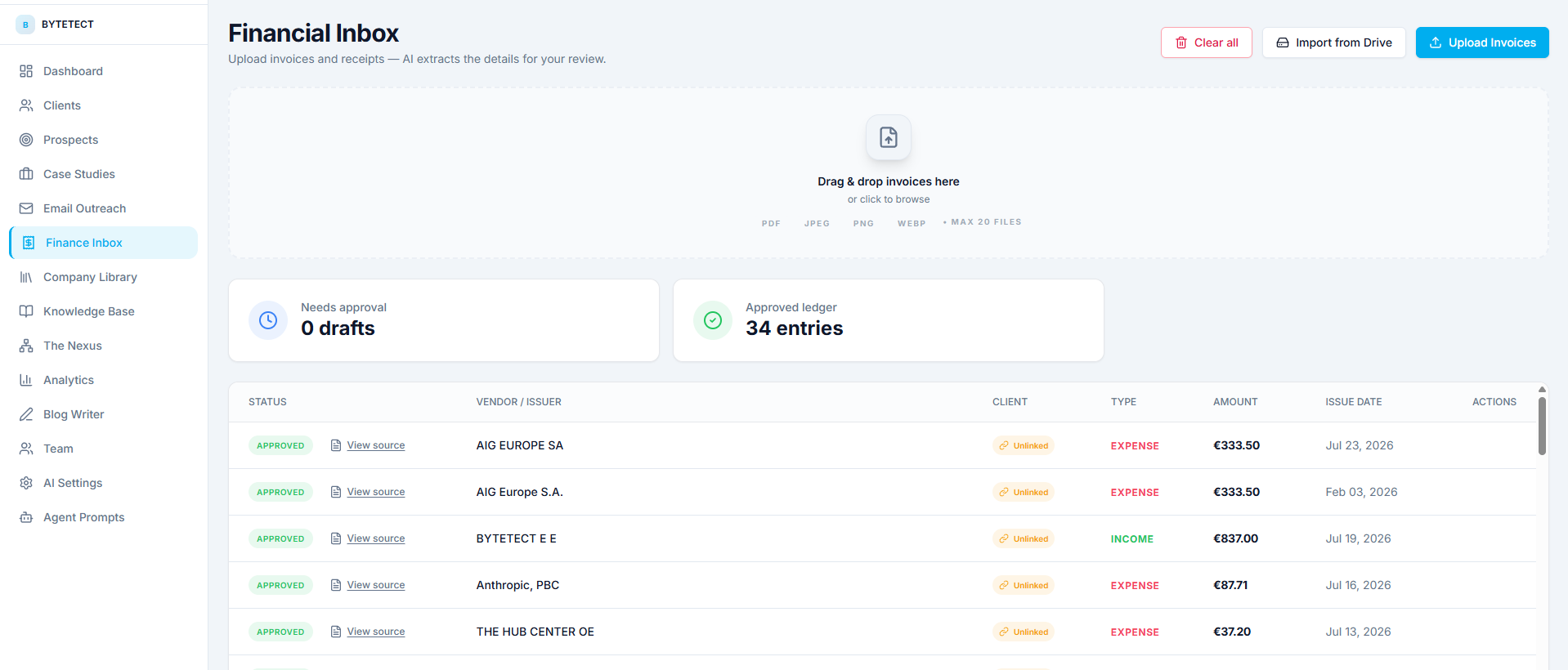
Three ways documents get in
Drag and drop. Drop up to twenty files at a time onto the inbox (PDF, JPEG, PNG, or WEBP). An upload queue shows the progress of each file, and extraction starts in the background the moment a file lands.
Import from Drive. Connect your Google account once, with read-only access, then pick any folder from your Drive. Nexus walks the folder and every subfolder, imports the documents it finds, and shows you a live progress panel while the job runs. Imports are idempotent: run the same folder twice and files that were already processed are skipped, not duplicated.
Watch a folder. The strongest option for a real workflow. Mark your invoices folder as watched and Nexus checks it every fifteen minutes. Whatever your accountant, your suppliers, or your scanner drops into that folder simply appears in the inbox a few minutes later. Nobody uploads anything by hand again.
What the AI extracts
Each document becomes a draft transaction with:
- Vendor or issuer, as printed on the document.
- Type: income or expense, inferred from the document itself.
- Amount and currency.
- Issue date.
- Source document: a stored copy of the original file, one click away from every row, so an auditor or a teammate can always see exactly what a number came from.
The inbox shows two counters at the top: how many drafts are waiting for approval and how many entries the approved ledger already holds. That is your work queue and your result, side by side.
Review, link, approve
Click any draft to open the review page. Every extracted field is editable, so a misread amount or a mangled vendor name takes seconds to fix. This is also where entity resolution happens: Nexus tries to match the document to one of your clients, and you can confirm the match, search for a different client, or create a new client and link it in one step. Transactions can also be tied to a business project, which is what later feeds project profitability.
Approval is a deliberate act with a permission behind it. Members can upload and edit drafts, but moving a draft into the approved ledger requires the manager role or above. One click on Approve and the transaction is finalized.
Working from chat
The Financial Inbox is fully wired into the agent loop. Ask things like “Summarize this month’s expenses” or “How much did we spend on software subscriptions?” and the agents answer from your approved ledger. Agents can also create transactions and import Drive folders on your behalf, but any action that writes data pauses in the chat and waits for your explicit approval before it executes. You will see exactly what the agent intends to do, and nothing happens until you say yes.
Housekeeping and safety
Start fresh. Admins get a Clear all button in the inbox header. It deletes every transaction for your company and resets the Drive import history for finance, so a watched or re-imported folder ingests everything from scratch. It asks for confirmation twice, because it cannot be undone, and the action is written to the audit log.
Audit trail. Approvals, clears, and agent-initiated writes leave audit entries, so there is always an answer to “who did this and when”.
A workflow that runs itself
Put the three pieces together and the routine looks like this: suppliers and staff drop documents into one Drive folder, the watcher pulls them in every fifteen minutes, extraction files them as drafts, and once a day someone with the manager role opens the inbox, reviews the queue, fixes the odd field, and approves. The ledger stays current, every entry traces back to its source document, and nobody has typed an invoice into a spreadsheet.
Frequently asked questions
What file types can the Financial Inbox process?
PDF, JPEG, PNG, and WEBP, up to twenty files per upload. Drive imports handle the same document types from any folder you pick.
Who can approve transactions?
Approval requires the manager role or above. Members can upload documents and edit drafts, and viewers can only read. Roles are explained in the Getting Started guide.
What happens if I import the same Drive folder twice?
Nothing bad. Imports are idempotent: files that were already processed are recognized and skipped, so you never get duplicate transactions from a re-run.
Where are the original documents kept?
Every uploaded or imported file is stored in your workspace’s cloud storage, and each transaction keeps a View source link to its document.
Can the AI change my ledger on its own?
No. Agents can read the approved ledger freely, but every write they propose pauses in the chat and waits for your explicit approval before it runs.
Where to go next
Next in this series: the Google Drive integration guide, covering shared drives, watched folders, and how imports stay idempotent. You can also browse all guides in the Docs section.
Deploy Nexus OMAS in your organisation.
A 30-minute architecture briefing, we map your data landscape and tell you honestly whether OMAS is the right fit.